> ## Documentation Index
> Fetch the complete documentation index at: https://help.captureiq.ai/llms.txt
> Use this file to discover all available pages before exploring further.
# CaptureIQ - Ask AI
**Ask AI** is a feature in CaptureIQ’s **Smart Analytics** suite that helps you quickly uncover insights from your form responses. Instead of manually scrolling through hundreds of entries, you can simply ask a question, and the AI will return clear, actionable answers — often with supporting visuals.
 ## **When to use Ask AI**
Ask AI becomes powerful once your form has gathered a decent number of responses (ideally more than 10–15). This makes it especially useful for:
* Surveys
* Feedback forms
* Customer satisfaction studies
* Employee engagement polls
* Any situation where respondents provide long text or multiple-choice answers
Here’s how to get started:
1. Go to **Results → Smart Insights**.
2. If it’s your first time, the page will be empty until you generate insights.
3. On the **top-right**, click **Generate Report**.
## **When to use Ask AI**
Ask AI becomes powerful once your form has gathered a decent number of responses (ideally more than 10–15). This makes it especially useful for:
* Surveys
* Feedback forms
* Customer satisfaction studies
* Employee engagement polls
* Any situation where respondents provide long text or multiple-choice answers
Here’s how to get started:
1. Go to **Results → Smart Insights**.
2. If it’s your first time, the page will be empty until you generate insights.
3. On the **top-right**, click **Generate Report**.
 * For 10–20 responses, insights are usually ready in **15–20 seconds**.
* For a few hundred responses, it may take up to **\~15 minutes**.
You can safely leave the page and come back later — your report will be waiting once it’s ready.
After pressing **Generate Report**, the button will remain disabled for 24
hours. After that, you can regenerate a new report with updated responses.
Currently, the system analyzes the most recent **500 responses** per form.
## **How Ask AI works**
Once your report is generated, you’ll notice a **floating window** at the bottom of the Smart Analytics page. This is the entry point for Ask AI.
* For 10–20 responses, insights are usually ready in **15–20 seconds**.
* For a few hundred responses, it may take up to **\~15 minutes**.
You can safely leave the page and come back later — your report will be waiting once it’s ready.
After pressing **Generate Report**, the button will remain disabled for 24
hours. After that, you can regenerate a new report with updated responses.
Currently, the system analyzes the most recent **500 responses** per form.
## **How Ask AI works**
Once your report is generated, you’ll notice a **floating window** at the bottom of the Smart Analytics page. This is the entry point for Ask AI.
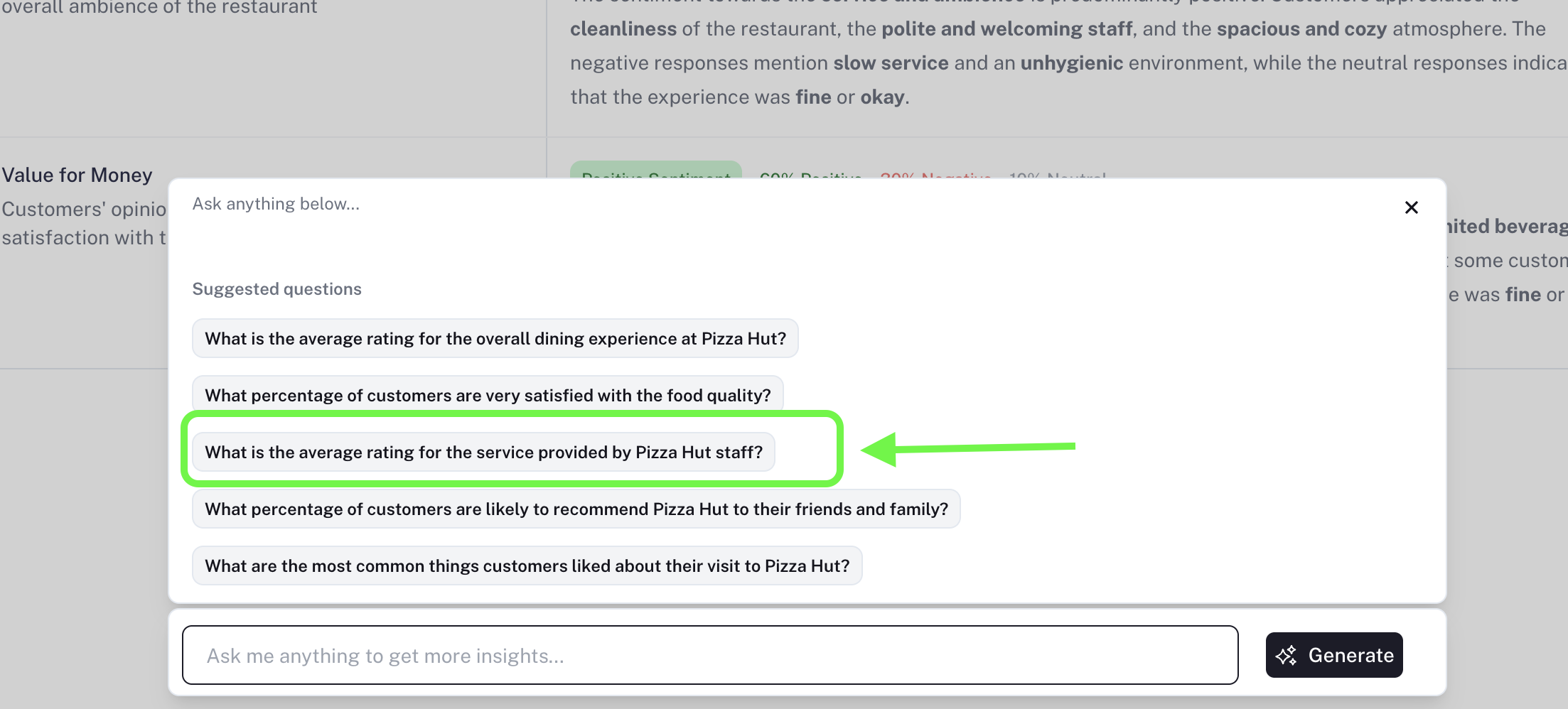 * Click on it to open a panel with **5 recommended starter questions**.
* You can use one of these or type in your own custom question.
* Ask AI understands both:
* **Open-ended fields**: Long Text, Short Text
* **Close-ended fields**: Multiple Choice, Dropdown, Ratings, Yes/No, etc.
* It does **not** analyze personal identifiers (like phone numbers or emails).
This means you can explore your dataset in the same way you framed your form — by simply asking the questions that mattered when you created it.
***
## **Example Questions You Can Ask**
**“What percentage of customers are likely to recommend Pizza Hut to their friends and family?”**
* Ask AI will calculate and return a **clear, percentage-based answer**, often with a supporting chart.
* Click on it to open a panel with **5 recommended starter questions**.
* You can use one of these or type in your own custom question.
* Ask AI understands both:
* **Open-ended fields**: Long Text, Short Text
* **Close-ended fields**: Multiple Choice, Dropdown, Ratings, Yes/No, etc.
* It does **not** analyze personal identifiers (like phone numbers or emails).
This means you can explore your dataset in the same way you framed your form — by simply asking the questions that mattered when you created it.
***
## **Example Questions You Can Ask**
**“What percentage of customers are likely to recommend Pizza Hut to their friends and family?”**
* Ask AI will calculate and return a **clear, percentage-based answer**, often with a supporting chart.
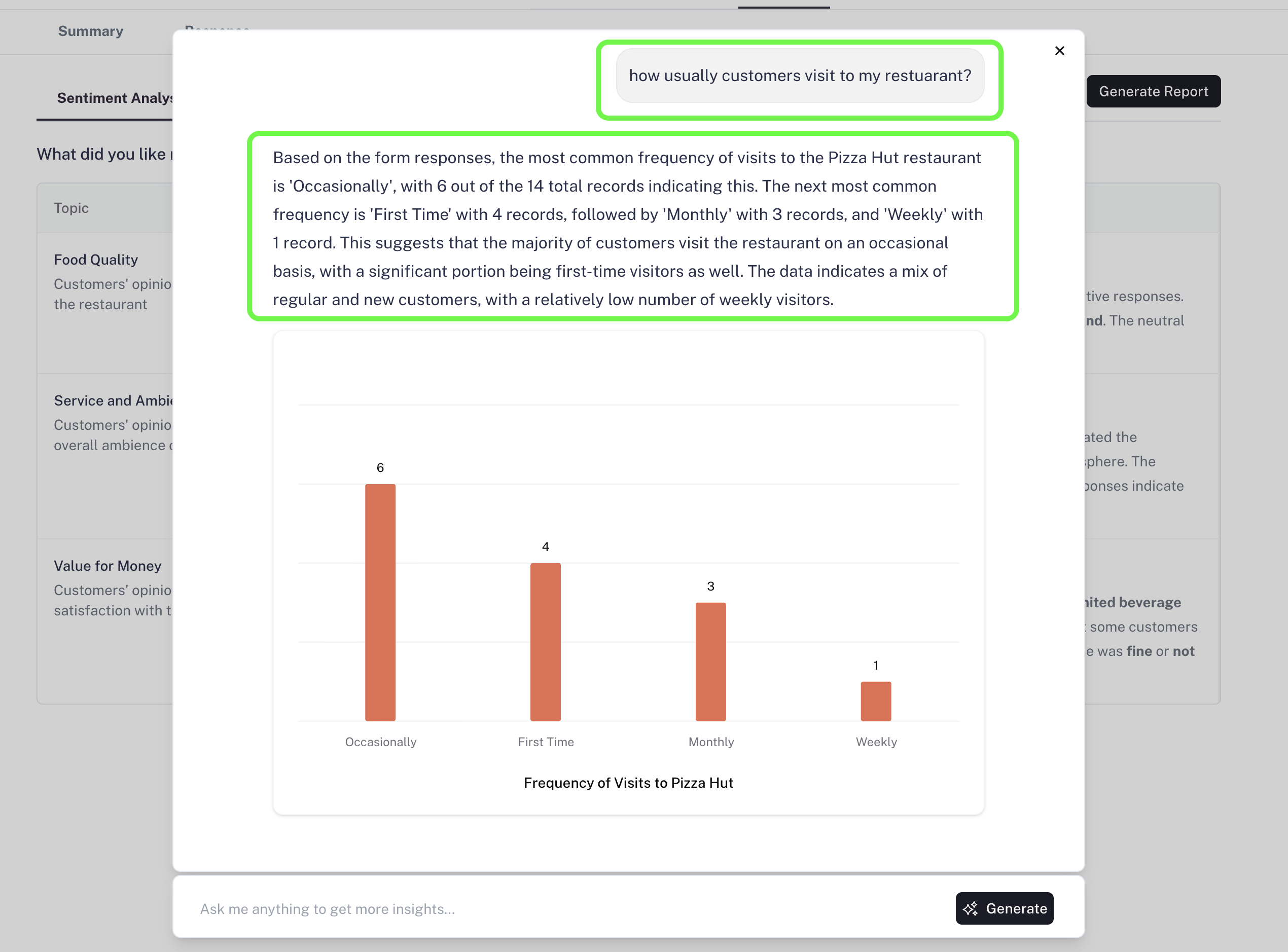
 **“How often do customers usually visit my restaurant?”**
* The AI will explain the findings, provide the breakdown, and include visuals to help you understand patterns.
**“How often do customers usually visit my restaurant?”**
* The AI will explain the findings, provide the breakdown, and include visuals to help you understand patterns.
 All your queries and AI answers are stored in the **Ask AI chat history**.\
Currently, the chat does not remember across sessions, but **memory support will be added soon**.
***
## **Why Ask AI is Valuable**
When you collect responses with a form, you usually have specific insights you’re looking for. Ask AI makes this easier by:
* Saving hours of manual reading and analysis
* Giving **direct answers to your exact questions**
* Identifying trends across both text and choice-based answers
* Presenting insights in a **clear, visual, and actionable** format
Whether you’re tracking customer satisfaction, employee engagement, or survey data, Ask AI works as your **personal insights assistant**.
***
## **Availability**
Ask AI is available on the **Growth** and **Professional** plans of CaptureIQ.
With Ask AI, you can stop digging through raw responses and instead focus on making smarter, faster decisions.
All your queries and AI answers are stored in the **Ask AI chat history**.\
Currently, the chat does not remember across sessions, but **memory support will be added soon**.
***
## **Why Ask AI is Valuable**
When you collect responses with a form, you usually have specific insights you’re looking for. Ask AI makes this easier by:
* Saving hours of manual reading and analysis
* Giving **direct answers to your exact questions**
* Identifying trends across both text and choice-based answers
* Presenting insights in a **clear, visual, and actionable** format
Whether you’re tracking customer satisfaction, employee engagement, or survey data, Ask AI works as your **personal insights assistant**.
***
## **Availability**
Ask AI is available on the **Growth** and **Professional** plans of CaptureIQ.
With Ask AI, you can stop digging through raw responses and instead focus on making smarter, faster decisions.