> ## Documentation Index
> Fetch the complete documentation index at: https://help.captureiq.ai/llms.txt
> Use this file to discover all available pages before exploring further.
# CaptureIQ - End Screens and Redirects
With CaptureIQ, you can decide how your form should end once a user submits it. You can either show a **custom end screen** or redirect them directly to another URL.
Note: This feature is available only on **Essential**, **Growth**, and **Professional** plans (not available on the Free plan).
### Step 1: Open End Screen Settings
* After adding all your questions, look at the **bottom-left panel**.
* Click on **Ending add icon button**.
 ### Step 2: Choose Your Ending Type
You’ll see two options. You can pick either one:
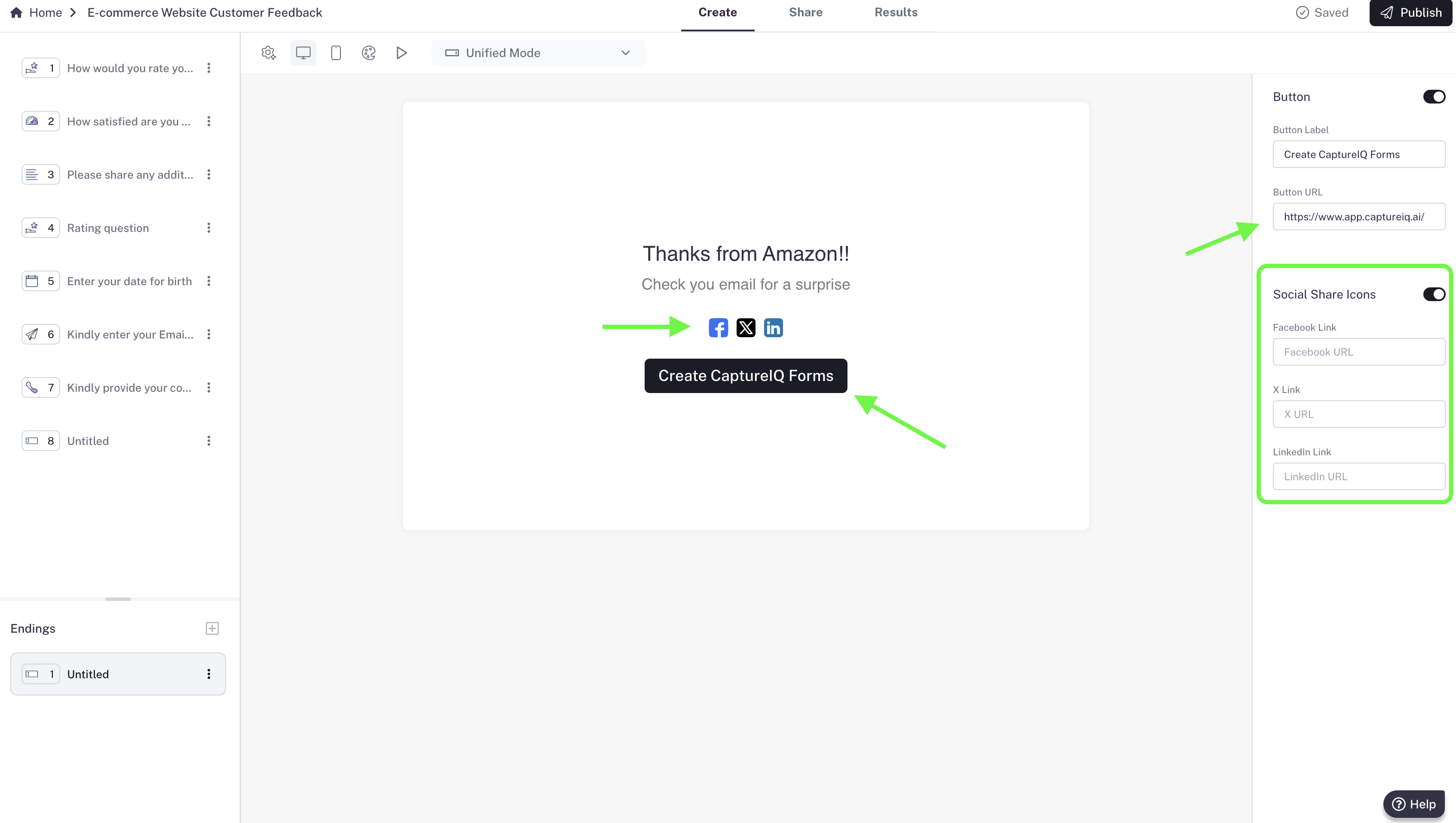
#### Option 1: End Screen
* Add a **custom title** and **description** to display when the form is submitted.
* Include a **button**:
* Customize the button text.
* Add a URL so users can visit your URL if they click it.
* Add **social media buttons** (Facebook, X, LinkedIn):
* Each icon can be linked to your respective profiles.
* Customize everything from the **right panel**.
### Step 2: Choose Your Ending Type
You’ll see two options. You can pick either one:
#### Option 1: End Screen
* Add a **custom title** and **description** to display when the form is submitted.
* Include a **button**:
* Customize the button text.
* Add a URL so users can visit your URL if they click it.
* Add **social media buttons** (Facebook, X, LinkedIn):
* Each icon can be linked to your respective profiles.
* Customize everything from the **right panel**.
 #### Option 2: Redirect URL
* Instead of showing an end screen, you can **automatically redirect users** to any URL after submission.
* Once they submit, they’ll instantly land on your chosen page.
* This is a powerful way to:
* Drive traffic to your website
* Take users to a thank-you page
* Show them an offer or next step
#### Option 2: Redirect URL
* Instead of showing an end screen, you can **automatically redirect users** to any URL after submission.
* Once they submit, they’ll instantly land on your chosen page.
* This is a powerful way to:
* Drive traffic to your website
* Take users to a thank-you page
* Show them an offer or next step
 ### **Step 3: Save Your Choice**
* Once you’ve customized your ending, published your form.
* Your form will now follow the chosen flow after submission.
### **Step 3: Save Your Choice**
* Once you’ve customized your ending, published your form.
* Your form will now follow the chosen flow after submission.