> ## Documentation Index
> Fetch the complete documentation index at: https://help.captureiq.ai/llms.txt
> Use this file to discover all available pages before exploring further.
# How to Share Your CaptureIQ Form: Links, QR Codes, Email & More
> Learn how to share CaptureIQ forms with your audience using unique links, QR codes, branded URLs, and social previews. Step-by-step guide for maximizing engagement.
Once you’ve designed and finalized your form in **CaptureIQ**, the next step is to **share it with your audience** and start collecting responses. CaptureIQ makes this simple by giving you multiple sharing options — from a direct link to QR codes, branded URLs, and social previews.
This guide will walk you through **all the ways you can share your CaptureIQ form** and how each option works.
***
## **1. Share the Form Link**
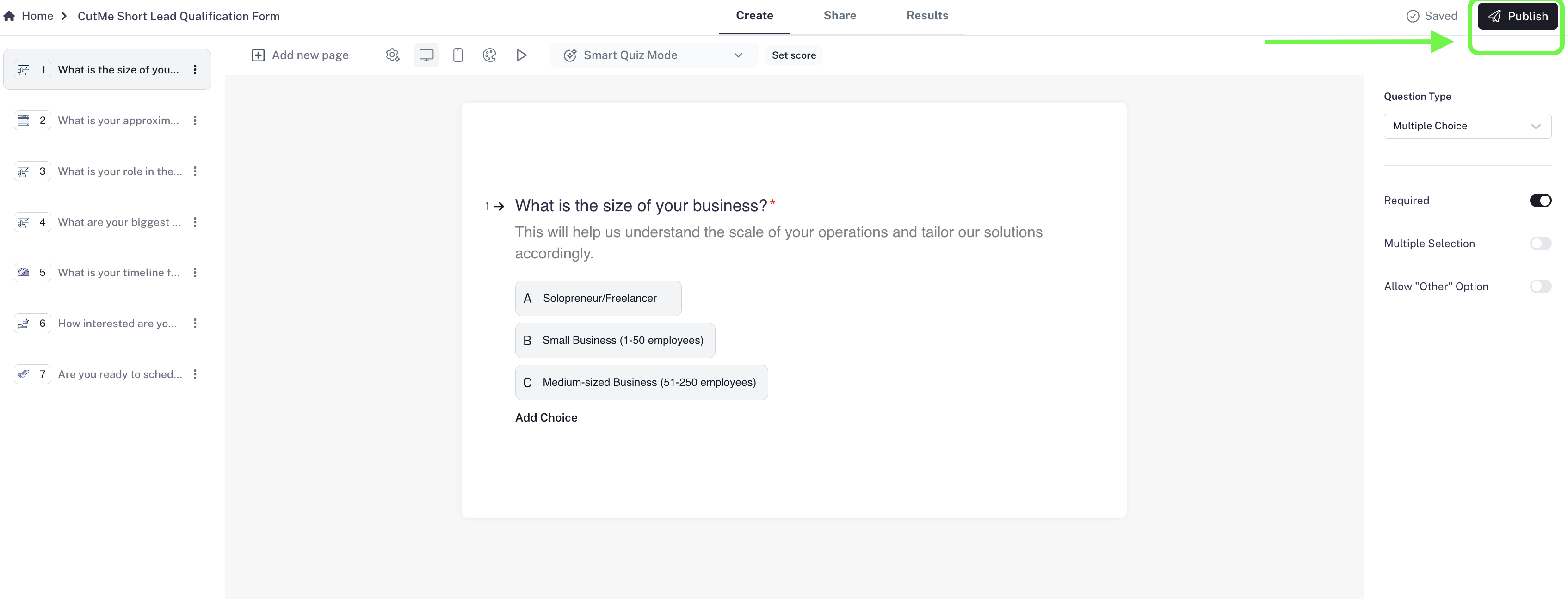
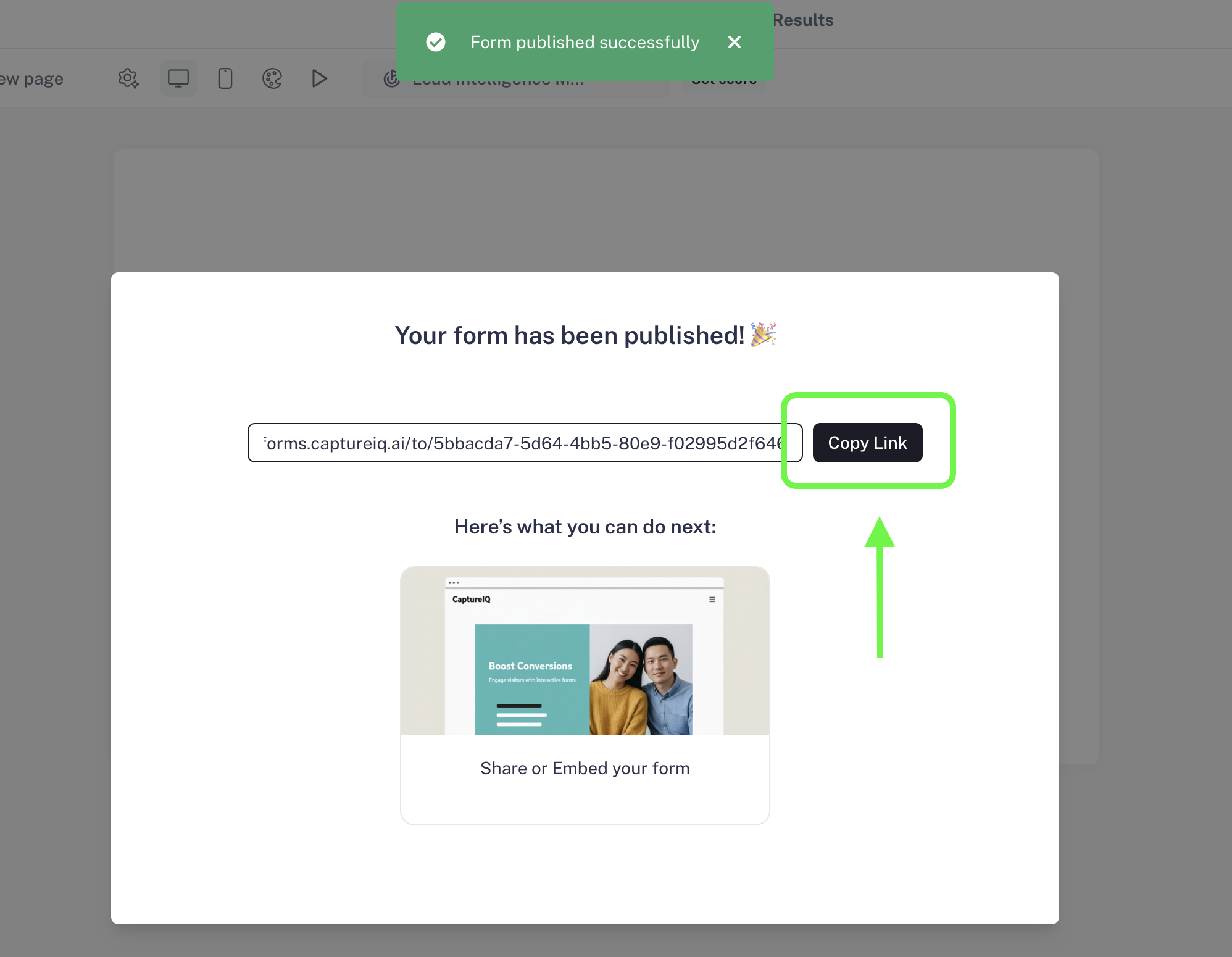
When you click **Publish**, CaptureIQ generates a **unique link** for your form.
 * This link can be copied and shared anywhere: email, social media, WhatsApp, or directly on your website.
* As soon as someone clicks it, they’ll be taken to your live form.
* This link can be copied and shared anywhere: email, social media, WhatsApp, or directly on your website.
* As soon as someone clicks it, they’ll be taken to your live form.
 This is the fastest and easiest way to start collecting responses.
***
## **2. Embed Form in Email**
CaptureIQ also provides an **email embed option** to make your form more engaging in newsletters or campaigns.
**Important to know**:
* Respondents **cannot fill the form inside the email itself** (most email providers don’t support this).
* Instead, the **first question of your form** is displayed inside the email as a teaser.
* When users click on it, the full form opens in their browser and they can continue filling it.
This increases engagement because your audience gets a **sneak peek** of the form right in their inbox.
## **3. Customize the Form URL**
Instead of using the default CaptureIQ link, you can make your form link **branded and professional**:
* **Custom Domain (CNAME setup):** Host forms on your own domain, e.g., `forms.yourcompany.com/survey`.
* **Custom Slug:** Edit the text after the slash, e.g., `captureiq.ai/my-feedback`.
A branded URL builds trust, looks professional, and is easier to remember and share.
***
## **4. Create a QR Code**
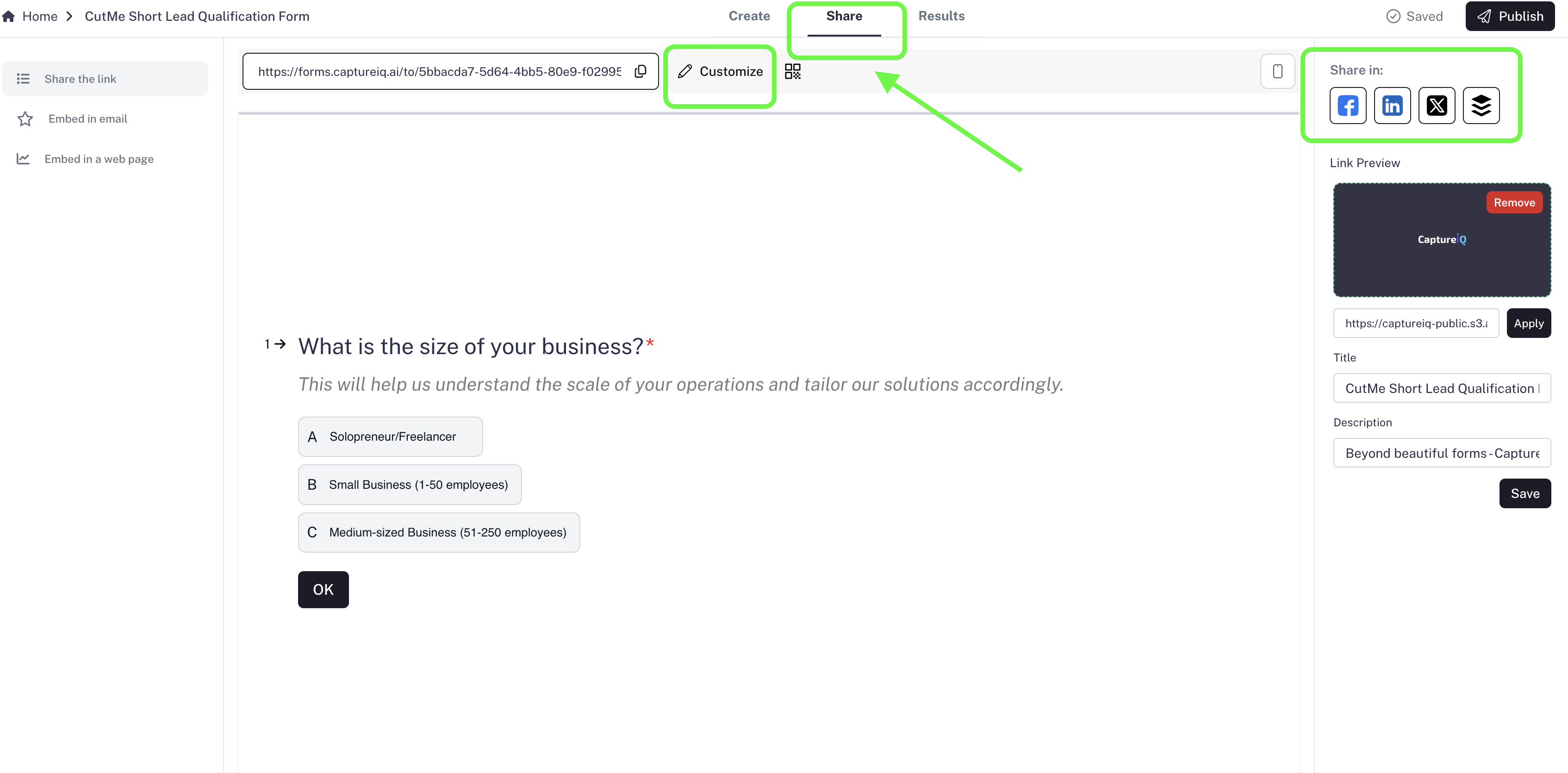
With one click, CaptureIQ generates a **QR code** for your form.
* You can download the QR code as an image.
* Place it on posters, brochures, packaging, menus, or any offline material.
* When scanned, it instantly opens your form on the respondent’s device.
This is perfect for **offline-to-online campaigns**, especially in events, restaurants, or retail.
***
## **5. Customize Social Media Previews (OGP Settings)**
When you share your form link on **social platforms** (LinkedIn, Twitter/X, WhatsApp, Facebook), a preview card appears.
CaptureIQ lets you **customize**:
* The **image** (logo, banner, or custom graphic)
* The **title**
* The **description**
This makes your form more attractive, clickable, and aligned with your branding.
This is the fastest and easiest way to start collecting responses.
***
## **2. Embed Form in Email**
CaptureIQ also provides an **email embed option** to make your form more engaging in newsletters or campaigns.
**Important to know**:
* Respondents **cannot fill the form inside the email itself** (most email providers don’t support this).
* Instead, the **first question of your form** is displayed inside the email as a teaser.
* When users click on it, the full form opens in their browser and they can continue filling it.
This increases engagement because your audience gets a **sneak peek** of the form right in their inbox.
## **3. Customize the Form URL**
Instead of using the default CaptureIQ link, you can make your form link **branded and professional**:
* **Custom Domain (CNAME setup):** Host forms on your own domain, e.g., `forms.yourcompany.com/survey`.
* **Custom Slug:** Edit the text after the slash, e.g., `captureiq.ai/my-feedback`.
A branded URL builds trust, looks professional, and is easier to remember and share.
***
## **4. Create a QR Code**
With one click, CaptureIQ generates a **QR code** for your form.
* You can download the QR code as an image.
* Place it on posters, brochures, packaging, menus, or any offline material.
* When scanned, it instantly opens your form on the respondent’s device.
This is perfect for **offline-to-online campaigns**, especially in events, restaurants, or retail.
***
## **5. Customize Social Media Previews (OGP Settings)**
When you share your form link on **social platforms** (LinkedIn, Twitter/X, WhatsApp, Facebook), a preview card appears.
CaptureIQ lets you **customize**:
* The **image** (logo, banner, or custom graphic)
* The **title**
* The **description**
This makes your form more attractive, clickable, and aligned with your branding.
 ***
## **Best Practices for Sharing Your Form**
* Always test your link before sending it to a large audience.
* Use a **branded URL or QR code** for offline promotions.
* Tease the form in your **email campaigns** with the embedded first question.
* Update your **social previews** to maximize clicks and engagement.
***
## **Final Note**
With CaptureIQ, sharing a form is more than just sending a link. You get multiple ways to distribute your form — **direct links, branded URLs, QR codes, email embeds, and optimized social previews** — making it easy to reach your audience wherever they are.
Start by publishing your form today and choose the sharing method that works best for your campaign.
***
## **Best Practices for Sharing Your Form**
* Always test your link before sending it to a large audience.
* Use a **branded URL or QR code** for offline promotions.
* Tease the form in your **email campaigns** with the embedded first question.
* Update your **social previews** to maximize clicks and engagement.
***
## **Final Note**
With CaptureIQ, sharing a form is more than just sending a link. You get multiple ways to distribute your form — **direct links, branded URLs, QR codes, email embeds, and optimized social previews** — making it easy to reach your audience wherever they are.
Start by publishing your form today and choose the sharing method that works best for your campaign.